Importing project metadata from data management plans in RDMO
When creating Coscine projects, it is possible to import project metadata from a data management plan (DMP) using the DMP tool RDMO (see video). This speeds up the project creation process and reduces the likelihood of errors when transferring metadata, as the information does not need to be entered manually multiple times.
The metadata is exported from RDMO via a JSON file and imported into Coscine. However, to use this function, certain requirements must be met in RDMO in order to generate a suitable JSON file for import into Coscine. If no suitable catalogue is available, you, as an editor, can create one yourself.
Hint: Contact for questions regarding RDMO
You can find answers to your questions about RDMO either in the RDMO documentation, by contacting the host of your RDMO instance, or in the RDMO community.
Requirements for importing RDMO data management plans
Coscine requires a JSON file signed by RDMO in order to store an ID for the relevant DMP. This enables Coscine to verify the information and map the DMP to RDMO in the event of any further technical connections. For Coscine to be able to read and process the JSON file exported from RDMO, two requirements must be met:
- Required plugins in the RDMO instance from which you wish to export the JSON file:
- Coscine plugin: This plugin enables the JSON file to be signed by RDMO, so that Coscine recognises it as reliable and imports it.
- DFG Subject Classification Plugin: This plugin enables the project’s disciplinary details to be formatted in a way that Coscine can process them. For the relevant catalogue, the ‘DFG Disciplines 2020–2024’ option must be selected.
- ROR plugin (Recommended): This plugin enables you to search the ROR database. Otherwise, you would have to enter the ROR manually.
- All information required for project creation must be available in the catalogue you are using and must be completed for export. As part of the DMP4NFDI incubator, in which this feature was developed, it is ensured that these RDMO catalogues are Coscine-compatible:
- Coming soon: NFDI4ING DMP Template, Version 3
- Coming soon: NFDI DMP Template Framework, Version 2
Hint: RDMO catalogs are still in progress
Work is currently underway to ensure that the two RDMO catalogs mentioned above are compatible with Coscine. As soon as the catalogs are available, we will let you know via our newsletter or news posts. There is already a project specific catalogue, FSC², which was created for the Excellence Cluster Integrated Fuel and Chemical Science Center of RWTH Aachen University. This catalogue is Coscine-compatible.
Procedure for importing project metadata from RDMO
Warning: This feature is only available in the new UI
Access the beta version of the new UI. Please note at this stage that the new version is not a test environment. Instead, the two versions will complement each other until the new version is available with its full range of features.
First, complete the catalogue of your choice in RDMO. Please ensure that all fields are filled in.
Hint: No standardised display names for the fields
Unfortunately, it is not possible to define standard display names for fields in RDMO, as each catalogue creator is free to choose their own. It is important that the necessary attributes are used. Here you will find all the necessary attributes if you are unsure whether your catalogue is Coscine-compliant.
Follow these steps to import data into Coscine:
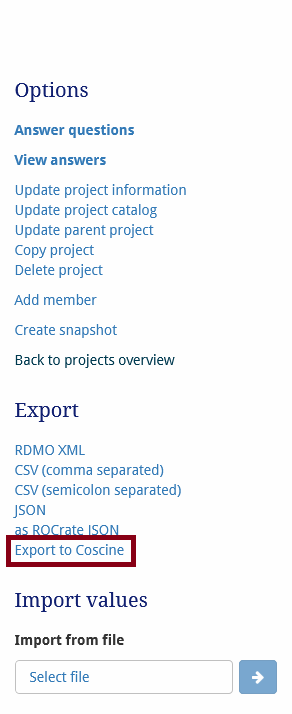
- Export a JSON file from RDMO. To do this, on the overview page of your DMP in RDMO, in the right-hand menu column under
Export, click onExport to Coscine(see Figure 1). Save the file.
- Log in to Coscine. Click on
Create projecton the dashboard. In the right-hand column, underAdditional options, you will find the optionImport from RDMO. Click on this button to open a file browser. (see Figure 2) - Upload the JSON file exported from RDMO to this window by dragging and dropping it or by selecting it from your drive. Click
Import. (see Figure 2)
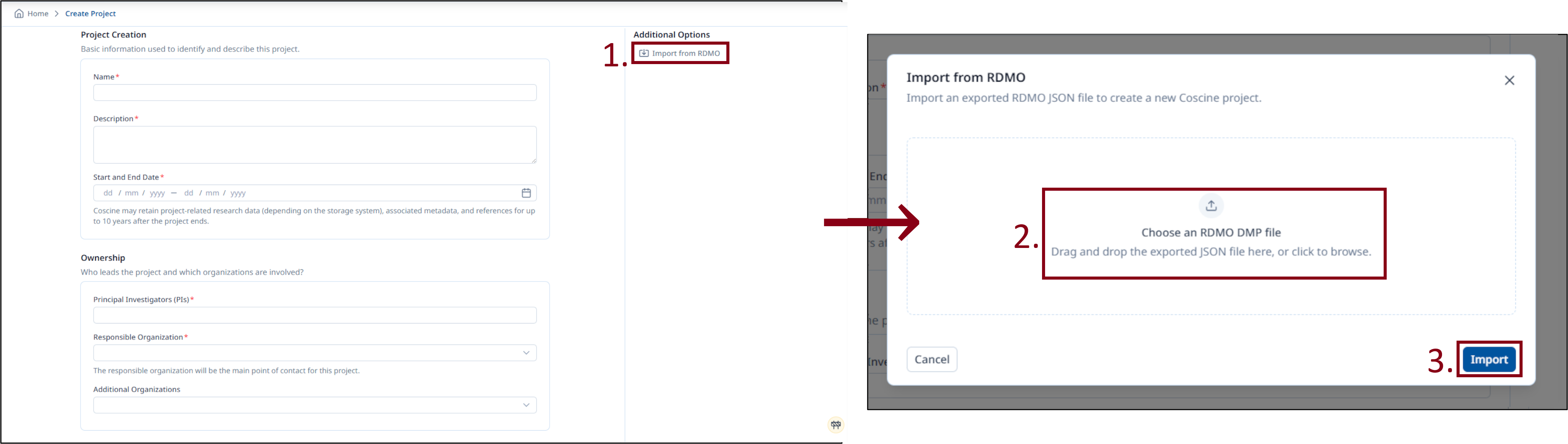
Coscine reads the JSON file after it has been uploaded and creates the project automatically. You can then manually edit individual pieces of project metadata via the Project Configuration.
Creating Coscine-compatible RDMO catalogues
RDMO assigns one attribute per question and answer in the DMP. During import, Coscine needs to know which attribute corresponds to which metadata field on the project creation page. A mapping has been created for this purpose. This means that RDMO catalogues can only be imported if they use these attributes.
Catalogues can be created and edited by editors. It is therefore possible to structure catalogues in such a way that they can be read by Coscine. If required, you can find support for this in the RDMO documentation, from the host of your RDMO instance, or within the RDMO community.
Mapping between RDMO attributes and Coscine metadata fields
| Coscine Metadata Field | Description | Format in Coscine | RDMO Attribute |
|---|---|---|---|
| Project name | Name of the project | Free text in the form of a string, maximum 200 characters | domain/project/title |
| Display name | Short title of the project | Free text in the form of a string, maximum 25 characters | domain/project/acronym |
| Project description | A brief and informative explanation of the project’s content | Free-form text in the form of a string, maximum 10,000 characters | domain/project/research_question/title |
| Principal Investigators (PIs) | Project management | Free text in the form of a string, maximum 500 characters | domain/project/coordination/PI |
| Project start | Project start date | ISO date format | domain/project/schedule/project_start |
| Project end | (Estimated) project end date | ISO date format | domain/project/schedule/project_end |
| Discipline | Academic discipline to which the project belongs | DFG classification | domain/project/research_field/title (For the relevant catalogue, the option ‘DFG Disciplines 2020–2024’ must be selected within the DFG Subject Classification plugin.) |
| Lead organisation | Lead organisation where the project is primarily carried out | ROR ID | domain/project/coordination/PI/organization/ror (The ROR must be entered in this format: https://ror.org/04xfq0f34) |
| Additional organisations | Organisations or NFDI consortia involved in the project | ROR ID | domain/project/partner/ror (The ROR must be entered in this format: https://ror.org/04xfq0f34) |
| Project keywords | Keywords to help categorise the project | Free text in the form of a string | domain/project/research_question/keywords |
| Metadata visibility | Projects and resources can be marked as public in Coscine |
- | This metadata field is not supported by RDMO. When importing into Coscine, the visibility is set by default so that only project participants can view the metadata. You can change this setting manually after the import. |
| Grant ID | Unique funding/identification number for the project | Free-text string, maximum 500 characters | domain/project/funder/grant_nr |