Storage-Reviewer
The role of Storage-Reviewer is performed by 1-2 people from each organization that uses resources with storage space in Coscine (e.g. from DataStorage.nrw). The persons belong to a reviewer pool in Coscine-JARDS and check incoming storage space applications. In the case of storage space applications from their own organization, they are automatically obliged to review the applications. They are assigned by the Coscine-JARDS Coordination.
Guidance for Storage-Reviewers
For detailed information on reviewing a storage space application in the role of a Storage-Reviewer, please refer to the Review Guidelines for Coscine DataStorage.nrw Resources. In addition, there is a Guide for Consultations on Coscine & Storage Space Applications
The review process is as follows:
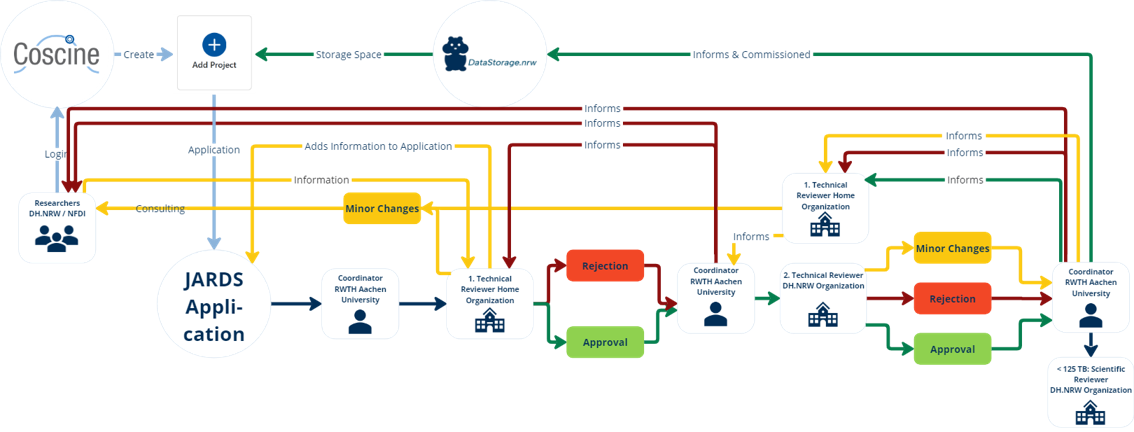
Below you will find instructions on how to review a storage space application as a Storage-Reviewer.
Enter absences in JARDS
If you are absent for a longer period of time (e.g. due to vacation or illness), please enter your absence in Coscine-JARDS.
This will prevent reviewers from being assigned to you and prevent the review from being carried out promptly. The setting can be
changed after login to the JARDS platform under Account --> Edit Profile --> Unavailability.
-
You will receive an e-mail notification that you have been assigned as a reviewer. In the e-mail you will find the ID of the request and a link to Coscine-JARDS. You can log in to Coscine-JARDS via e-mail callback or via the RegApp.
-
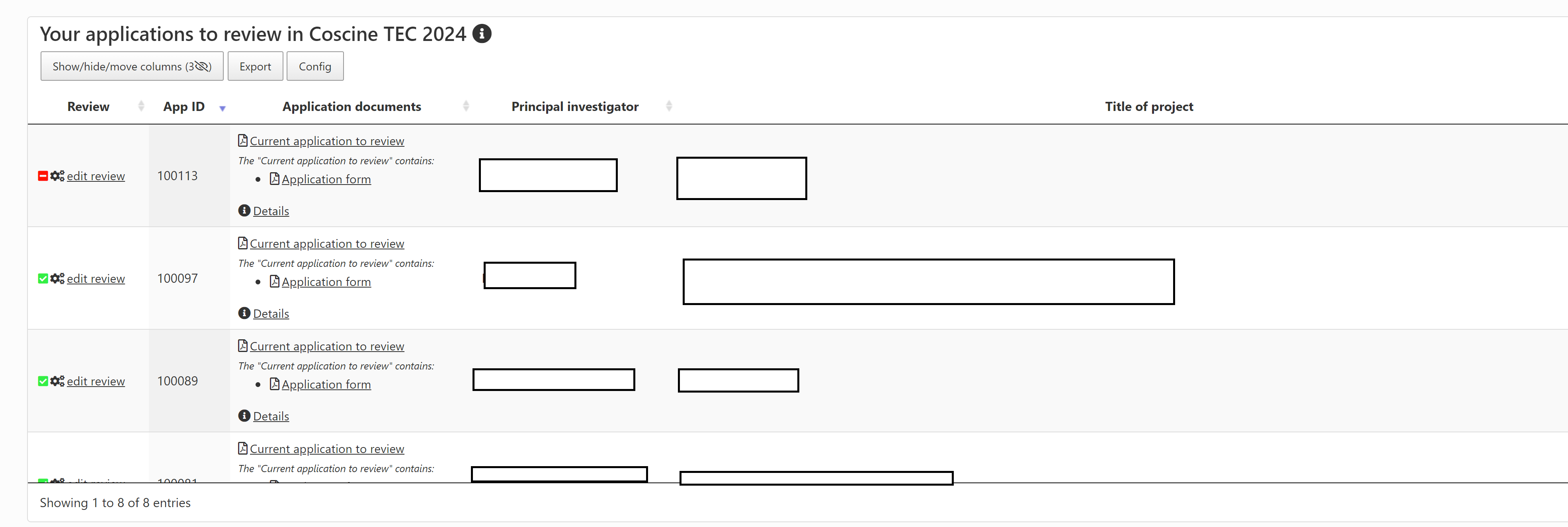
As shown in Figure 3, all the storage space applications allocated to you are listed. If you do not see these immediately, you can switch to "Coscine TEC xxxx" under the "Group" tab at the top. You will then also see all allocated storage space applications. You can now carry out the review using the "Edit Review" button.
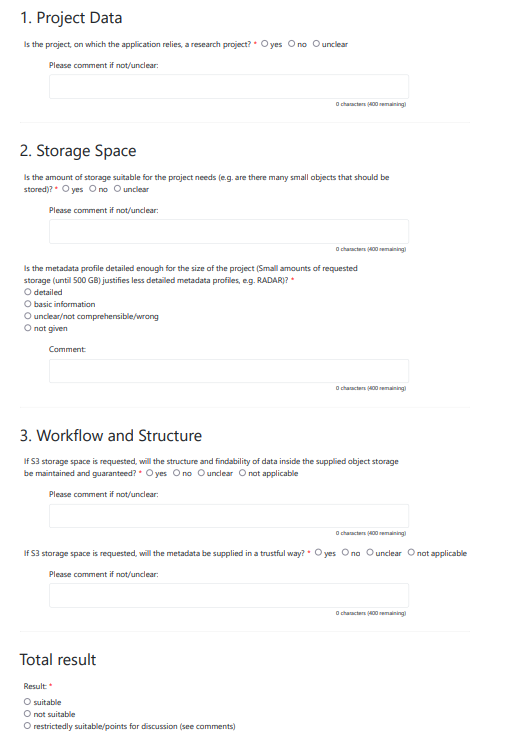
- During the review, all questions regarding the storage space request are answered, e.g. whether the requested quota is in proportion to the information provided or whether the workflow in Coscine is comprehensible. The questions which are answered by the Storage-Reviewers for a technical review can be seen in Figure 4.
Hint: Adding comments
As reviewers, you have the option to add comments as part of the review process. One field is intended for the applicants, the other for the Coscine-JARDS Coordination team. Please note that these comments are not visible to other reviewers.
-
Finally, a decision is made as to whether the application can be approved (suitable) or must be rejected (not suitable) from the storage reviewer’s perspective. If the application is rejected, the researchers have the option to make a revision, so called major revision, and resubmit it.
-
If, as a storage reviewer, you have reviewed a storage space application from your own university and still have questions for the applicant, you can clarify these, for example, by email or during a consultation. Information from a consultation can be added in the form of a comment. To do this, under
Collection of your applications to review, click onAddnext to the speech bubble icon for the relevant application. The comment length is limited to 500 characters. If, during your enquiries to the users, you realise that you need more space for the additional information required for the second assessment, we recommend that you reject the application and ask the researchers to submit a major revision. -
As soon as both reviews have been carried out and a clear result for the approval or rejection of the storage space application has been determined, the storage admins will carry out the rest of the process.
Hint: Questions on conducting the reviews
If you have just taken on the role of storage reviewer or have any general unanswered questions, please feel free to ask them during the monthly consultation session. You can find more information here.